 Live Ambience
 Central manual
The Central is the app that sends the music from a headquarters computer to all your locations. It runs in Microsoft Edge or Google Chrome with nothing to install, and it can be installed as an app.
Permitted use. The Central is a tool to distribute your own music tracks to your stores: created by you and with your own copyright. Under no circumstances is it a way to get around copyright or to rebroadcast radio stations, music services or third-party works, and Live Ambience is not responsible for any misuse of the tool.
Opening it
In My account tap Open the Central, or go to https://liveambience.com/central. It uses your My account session. Edge offers to install it as an app (icon in the address bar): it gets its own window and is harder to close or reload by accident.
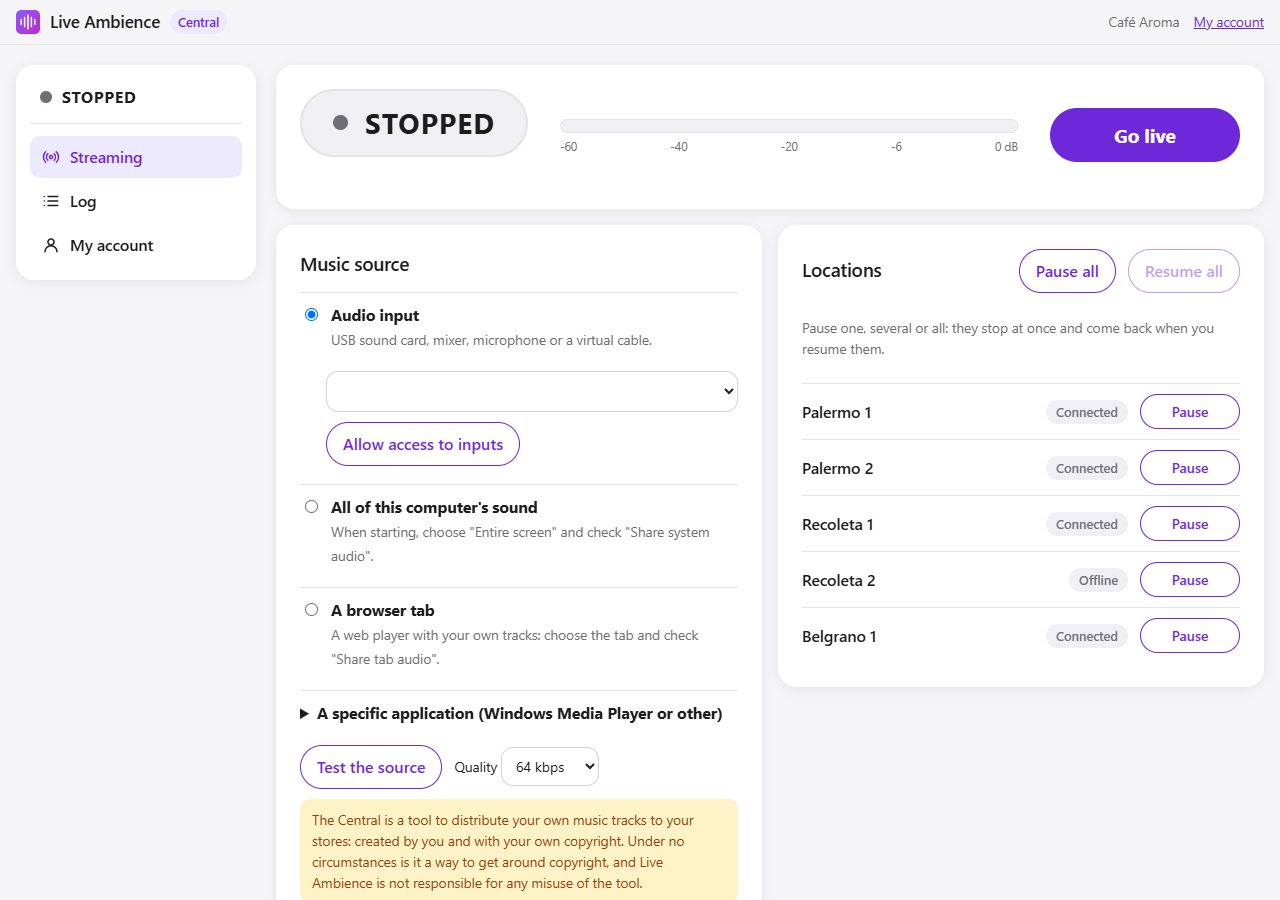
The screen
- On the left, the status (ON AIR, STOPPED, CONNECTING) always in view and the menu: Streaming, Log and My account.
- At the top, the large status, the level meter and the Go live / Stop button. Below the button, how many players are listening.
- Bottom left, the music source.
- Bottom right, your locations.
Choosing the source
- Audio input: a USB sound card, a mixer or a virtual audio cable. The first time tap Allow access to inputs and pick the input from the list. It is the most stable option.
- All of this computer's sound: when starting, choose "Entire screen" and check "Share system audio".
- A browser tab: a web player with your own tracks. Choose the tab and check "Share tab audio".
- A specific application: send that application to a virtual audio cable (for example VB-Cable, free) from the Windows Volume mixer and choose that cable as Audio input. That way only that application plays at the stores.
Tap Test the source: the meter should move with the music. Quality (64, 96 or 128 kbps) sets how much internet each store uses; 64 kbps is enough for background music.
Going live
Tap Go live. Within seconds the status turns ON AIR and the locations' players start playing by themselves (it takes up to 10 seconds).
- If the internet drops, the Central retries by itself.
- If you open the Central on another computer and go live, that one takes over and this one stops.
- If you reload the page, the browser stops the capture for security. With Audio input, the Central goes back on air by itself. With a tab or the screen, the browser requires choosing it again: a blinking Go live again appears, one tap.
- If you close the window while on air, the browser asks first.
Pausing locations
In Locations you see each store with its status:
- Listening: receiving your stream.
- Connected: the player is on but not receiving audio right now.
- Offline: the player is off.
- Paused: you paused it.
Pause stops a location and Resume turns it back on. Pause all and Resume all act on all of them. The pause is immediate: the music stops at the store and its screen says PAUSED · Stopped from the Central. The time, weather and messages don't play either. When resumed, it comes back by itself within seconds. The pause stays even if the store computer restarts.
If the Central stops streaming
If you tap Stop, close the Central or the internet drops at headquarters, each store switches by itself to its backup music (if you uploaded it in My account, Music section) and goes back to live with a fade as soon as you stream again. Without backup music, the store stays silent and waits. A paused location plays nothing: neither live nor backup music.
Log
Shows what happened (connections, drops, pauses), newest first. It helps you understand what happened if a store was without music.
Troubleshooting
- The meter doesn't move: the source sends no sound. Check that it is playing and, with a tab or the screen, that you checked "Share audio".
- "The signal is clipping": lower the source volume.
- Stores hear an echo or repeated music: don't use "All of this computer's sound" if a player is open on that same computer, because the Central captures it again.
- "Another Central started streaming": someone went live from another computer with your account.
- This browser cannot stream: use an up-to-date Edge or Chrome.